



In B2B prospecting, every detail matters. A poorly calibrated subject line, an overly generic message, or a sloppy email signature can send a promising email straight to the trash. The integration between Smartlead and Signitic addresses this problem directly: it automatically injects professional signatures and marketing banners into your cold emailing sequences, making your automated emails look like genuine human messages.
Here is why this combination is a real game-changer, and how to get the most out of it.
Smartlead: the cold emailing tool built for scalability
Smartlead is a cold outreach platform designed to send personalized emails at scale, without sacrificing deliverability. Its key features include:
- Unlimited mailboxes, to distribute sends and avoid blacklists.
- An AI-powered warm-up system, that gradually prepares your domains for high-volume sending.
- A unified inbox, to centralize all your conversations without switching tools.
- Full revenue cycle tracking, from the first touchpoint through to close.
What Smartlead does very well is high-volume automation. What it does not do natively is polish the presentation of each email — particularly the signature, which remains one of the strongest signals that a message is authentic.
Signitic: centralized email signature management
Signitic is a SaaS solution that lets you create, deploy, and manage email signatures for all your employees from a single interface. In practice, this means:
- A consistent visual identity across all outgoing emails, without relying on each salesperson to get it right.
- Dynamic marketing banners planned in advance — product launches, events, whitepaper downloads — embedded directly in signatures.
- Instant deployment on Google Workspace and Microsoft 365, with no action required from individual users.
Maximize response rate and engagement with Signitic 💡
Cold emailing is built on a constant tension: sending at scale while creating the impression of a one-to-one exchange. Automation tools solve the volume problem. They do not solve the credibility problem.
An email with no signature, or with a basic auto-generated text signature, immediately betrays automation. The recipient feels it, often unconsciously, and their engagement drops. By contrast, a well-structured signature with a photo, full name, title, relevant links, and a visual banner brings the email much closer to a genuine 1-to-1 message.

A professional and attractive signature and banner, after a convincing email, captures the attention of your prospect. It is an additional CTA, a possibility of engagement, and especially the marker of a “classic” email that your prospects will be more likely to respond to.
Thanks to the integration with Signitic, you are in a position to automatically broadcast your signatures and campaigns in the numerous emails sent every day by Smartlead to bring them even closer to a real 1to1 email.
The direct impact on deliverability
This point is frequently overlooked: the HTML code quality of your signature directly influences your deliverability. Cold outreach tools like Lemlist or Smartlead are sensitive to the structure of the emails they send. Clean, well-structured signature code, free of redundant tags and poorly encoded images, reduces the risk of being filtered by mail servers or flagged as spam.
This is where a dedicated solution like Signitic makes the difference: the signatures it generates are technically optimized for maximum compatibility with major email clients (Gmail, Outlook) and to avoid unnecessarily inflating email size — a factor that spam filters closely monitor.
What eye tracking reveals about reader behavior
Eye tracking studies clearly show that an email's signature and its accompanying banner are among the zones actively scanned by readers. It is not a dead zone that gets skipped, it is a space for reassurance and action.
In practice, this translates to:
- Higher click-through rates on links in the signature (website, LinkedIn, Calendly…).
- Better sender recall, thanks to the photo and logo.
- A social proof effect: a prospect who sees a polished signature perceives a higher level of professionalism, which directly influences their willingness to reply.
The banner plays a complementary CTA role. It redirects toward an offer, a resource, or a booking page without feeling intrusive, since it is naturally integrated at the end of the message.
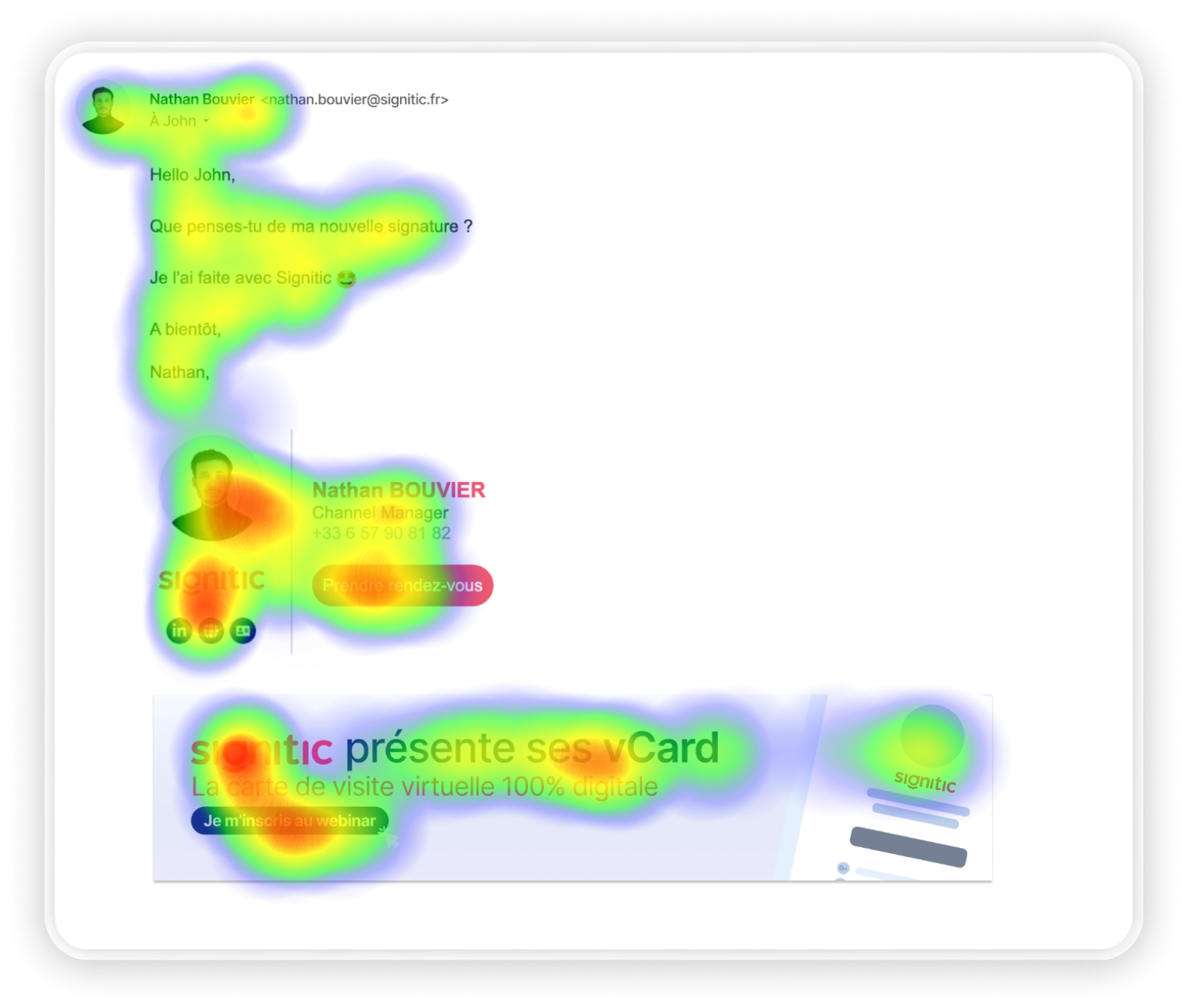
Undoubtedly, all of these elements together change the entire perception of the recipient. It is therefore on these specific areas that your organization must focus on to strengthen the power of your emails.
{{ban}}
Best practices for an effective signature in prospecting
What it should include
- A photo or logo: to humanize the email and help prospects connect you to previous exchanges or content.
- Full name, title, and company: basic information still missing from too many auto-generated signatures.
- Useful links: website, LinkedIn profile, Calendly booking page, or a case study link — each one is an additional engagement opportunity.
- A banner with a clear call to action: ideally aligned with the sequence context (download, demo, event).
What it should avoid
- Inline-attached logos or images, which inflate email size and can trigger spam filters.
- Overly long signatures with five phone numbers and ten social icons — they dilute attention.
- Non-optimized HTML code, a source of rendering issues in Outlook and deliverability penalties.
How the Smartlead + Signitic integration works in practice
Once the integration is configured, Smartlead automatically injects the Signitic signature into every email sent via its sequences. No need to manually update each template: the signature is managed in Signitic and updates in real time.
This means that when you launch a new banner for a webinar or product release, it will immediately appear in all your active Smartlead emails — without modifying any sequence. This is a significant time-saver for sales teams managing multiple campaigns simultaneously.
To set up the integration, follow our guide.
In summary: what you concretely gain
The Smartlead + Signitic integration is not a nice-to-have. It is an answer to a real problem: how do you make thousands of automated emails look like genuine human messages?
- Higher reply rates: an email that looks like a real 1-to-1 message mechanically generates more responses.
- Improved deliverability: clean-code signatures optimized for Smartlead and Lemlist reduce spam risk.
- An additional CTA: the banner provides a passive engagement touchpoint without overloading the email body.
- Brand consistency: all your salespeople prospect with the same visual identity, regardless of the sequence.
- Time savings: signature and banner updates propagate automatically, with no changes to templates needed.
Remember that your email signature and communication banner represent an opportunity to capture the attention of your prospects and maximize your engagement rate.
If you already want to set up this integration, follow our configuration guide.









